Showing posts with label First Look. Show all posts

September 9, 2009

Fujitsu Esprimo Q1500


Fujitsu Esprimo Q1500 is the latest Mini PC from Fujitsu. If you see it from outside you will never belive it is a PC that can play HD video. But Fujitsu was able to fit mobile Core 2 Duo CPU, slot-loading Blu-ray drive, 4GB of memory and a 320GB hard drive in to this tiny PC. It has a HDMI out and it will play 720p video's in your big monitor or TV without any problem.


Starting price for this monster will be $998 (699 Euro) when it will release later this month.

For more Photo's and videos please click this link.

August 26, 2009

Nokia Booklet 3G

Nokia, the world famous mobile phone manufacturing company announced their first mini laptop called Nokia Booklet 3G. It's a very nice looking 10.1 inch netbook. comparing to the other netbooks Nokia Booklet 3G comes with many connectivity options including integrated 3G, a swappable SIM card, A-GPS, Bluetooth and WiFi. On 2nd of September Nokia will officially announce the price for this netbook but, some websites announcing that it will cost $799


Apart from that Nokia Booklet 3G will run on 1.6GHz Intel Atom Z530 processor and has a 120GB hard drive. This will have 12 hours of battery life. When considering that this is a netbook, is shocking but if it comes with Windows 7 Home Premium.

August 12, 2009

Google Voice

For my point of view Google Voice is great free service that we all should have. It's still on Beta testing and you can only get it by an invitation. Google voice is basically phone redirecting service. You'll have a Google phone number and all your other phone numbers are associated with it. You can decide which phone should ring according to who's calling. It can be your home phone, Office phone or your cell phone. You also get standard features like call forwarding, Voice mail, SMS and call conferencing with Google Voice. Best thing is if you change your cell phone number, Office phone number or may be your home phone number you just have to change it within the program, So you don't have to bother to send the news to everybody that you have changed your number. Your Google number will remain same no matter what.


If you interested on it click here to see how Google Voice works with your phones.

Click here to find out what's new on Google Voice.

If you are lucky enough to have a Google Voice account click here to log in to your account.


August 2, 2009

Related Posts For Blogger Using LinkWithin

Displaying related posts near to the main stories are very common among professional Blogs. It will attract your readers to dig more in to your blog to read similar stories. More digs means more page views. I'm pretty sure that you all love it. You will be able to find these widgets on some of the blogger templates. But LinkWithin related post widget is way more different than the others.

LinkWithin related post widget retrieve and index all stories from your blog archive, not just recent stories, then display them under each post with photo thumbnails. It's really easy to implement on your current blog and it does not requires any sign-ups. This widget is minimally styled (Black or white is the only options available) and blends in with your site design.


How to place this widget on your blog

You need to visit LinkWithin website to grab this widget. Fill the information on right hand side of the page and click the Get Widget button. It supports few main blogging platforms including blogger.

If you are using a simple blogger template just Install Widget button. It will automatically placed under blog posts. If not go to the blogger dashboard click the layout button and you can move the newly added HTML / Java Script box.


If you are a advance user select other from the platform drop down. This will show you the Java Script code and you can copy paste it where ever you like.


April 12, 2009

nVIDIA Ion Platform

What is nVIDIA's Ion platform ? It is a combination of the Nvidia GPU with an Intel Atom microprocessor that's comes with a small-form-factor design. So, What is special about this PC ? As you all know, Netbooks which runs on Intel Atom processor just allowing you to do your regular stuff. It is really difficult to Play a good quality video game or watch a high definition videos on a netbook. But recently Acer and Nvidia announce their first Ion PC which called "AspireRevo" This product features the incredible graphics processing power of NVIDIA ION coupled with the low power Intel Atom 230 processor. This Ion PC allows you to Watch 1080p HD movies, play DirectX 10 games at great frame rates, and enjoy all the 3D capabilities of Microsoft Windows Vista Premium.


AspireRevo


Watch these videos and take a good look at it.


Terminate your self

This is a cool web site that allows you to change your picture in to a Terminator. As you all know by now, newest Terminator Film "Terminator Salvation" is going to come in to theaters in 21st of May. This site has two methods uploading your photos to it. You can simply browse and select your photo or you can use your web cam to take a photo on that time.


February 17, 2009

Skype 4.0 For Windows


Skype recently release their newer skype version for windows. It's called Skype 4.0 With this new version you'll get all the fetures which you used to have on your old skype program plus Bigger video, Crystal clear and even more reliable Calls and Pick up and switch between conversations.

New skype interface is redesigned for the newer version and it's beautiful. To setup this on your computer you'll need following system requirements.

  • PC running Windows 2000, XP or Vista. (Windows 2000 users require DirectX 9.0 for video calls)

  • Internet connection – broadband is best (GPRS is not supported for voice calls)

  • Speakers and microphone – built-in or separate

  • For voice and video calls we recommend a computer with at least a 1GHz processor, 256 MB RAM and of course a webcam

  • For High Quality Video calls you will need a high quality video webcam and software, a dual-core processor computer and a fast broadband connection (384 kbps)


  • Download Skype 4.0 For Windows from here

    February 13, 2009

    Best Gaming Notebook #2

    Welcome to my second post on best gaming notebooks. This time I have a Dell notebook with me. It's Dell XPS M1730 Laptop. It is on top of the line in Dell XPS gaming laptops. This laptop is designed more similar as Alienware Laptops. It has lot of lighting everywhere. It comes with Core 2 Duo Processors. You'll get windows Vista with it. Very eye catching design and it equipped with all the modern mobility and multimedia options.

    Full Technical specs

    Operating system

    Genuine Windows Vista Ultimate
    Genuine Windows Vista Business
    Genuine Windows Vista Home Premium
    Genuine Windows XP Professional

    Processor

    Intel Core 2 Duo T8300 (2.4GHz/800Mhz FSB/3MB cache)
    Intel Core 2 Duo T9500 (2.6GHz/800Mhz FSB/6MB cache)

    Memory

    Up to 4GB Dual Channel 667MHz DDR2

    Graphics

    NVIDIA GeForce 8700M GT graphics
    NVIDIA SLI Dual GeForce 8700M GT with 512MB GDDR3 Memory
    NVIDIA SLI Dual GeForce 8800M GTX with 1GB GDDR3 Memory

    Screen

    17" UltraSharp Wide Screen WUXGA (1920x1200) display with TrueLife

    Sounds

    Standard:
    5.1 channel output with for true surround sound experience with no external decoder required.
    2 speakers with 2 18mm transducers per speaker enclosure providing 10 watt output power.
    Premium Digital Array microphones for enhanced voice and communication applications.

    Optional:
    Integrated Sound Blaster Audigy HD sound processing software for enhanced gaming,
    music, and movie experiences

    Hard Drives

    Single Drive:
    Up to 320GB configured with a single 5400 RPM SATA II hard drive.
    Up to 200GB configured with a single 7200 RPM SATA II hard drive.

    Dual Drive: (RAID 0)
    Up to 640GB configured with (2 x 250GB) 5400 RPM SATA II hard drives.
    Up to 400GB configured with (2 x 200GB) 7200 RPM SATA II hard drives.
    Up to 128GB configured with (2 x 64GB) Solid State Hard Drives.

    Dual Drive: (RAID 1)
    Up to 250GB configured with (2 x 250GB) 5400 RPM SATA II hard drives.

    Solid State Drives:
    64GB configured with a Solid State hard drive.

    Optical Drives

    DVD+/-RW with Dual Layer DVD+R write capacity
    Blu-ray Disc

    I/O Ports

    4 USB 2.0
    Dual-link DVI-I (support for 30-inch displays)
    HDMI via DVI adapter
    VGA via DVI dongle
    Firewire (IEEE 1394a)
    RJ45 Ethernet port (10/100/1000)
    S-video with component, composite, S/PDIF support through dongle
    8-in-1 card reader
    ExpressCard 54 mm slot
    Consumer IR
    Dual headphones, microphone (stereo line-in) and support for 5.1 audio out

    Camera

    Integrated 2.0 MP camera

    Communication

    Wi-Fi Options:
    Intel Pro/Wireless 3945 802.11 a/g Mini Card Wireless
    Intel Next-Gen Wireless-N Mini Card

    Long Range Wireless:
    Dell Wireless 5520 HSDPA
    Dell Wireless 5720 EVDO

    Additional Options:
    Bluetooth 2.0

    Weight & Dimensions

    Weight: Starting at 10.6 lbs (4.81 kg)
    Width: 16.0" (406 mm)
    Height: <2.00">


    January 30, 2009

    What's Inside Windows 7

    Few days ago I have installed Windows 7 on a test computer. But I haven't got a time to check it. But today I thought to make a post about it. In this post you'll find some of the new things that included with windows 7. I'm writing this post using the same windows 7 computer.


    Before we start; I'll let you people know my system configuration for this test computer.

    Processor : Intel Celeron 2.8 GHz
    RAM : 1.5 GB DDR 1
    VGA : Geforce FX 5200 (AGP) 128MB
    Hard Drive : 80 GB SATA
    Optical Drive : Standard DVD ROM

    That gives me a Rating of 2.0 on windows experience Index.


    First thing I did notice was It's almost like windows Vista. But there are lot of changes have been made to it. The Task bar is changed. You won't have longer names displayed on it any more. It's just showing the program Icon now. If you open couple of windows for same program it's still showing you one Icon. But if you move your mouse over it, it will display all. Show desktop button has moved to the right hand coner of the taskbar.


    One other change that i have noticed was when I’m taking the screen shots; they have changed the Microsoft Paint program. Now it's look like Microsoft office 2007 application. You can do many more things now with the paint program.


    It's coming with Internet Explorer 8. So far I didn't find any errors on it.


    Control pannel is little bit changed but pretty much same as windows vista. What's new is now you have a button called "All control pannel items" that's take you to the classic control pannel. Security center renamed as Action center in here and you'll find new item called "Biometric Devices" that's allow you to manage your finger print recognition device which help you to log in to the system.


    Windows calculator is really good looking in Windows 7. Other than old Standard and Scientific mode it does have programmer mode and statistics mode. It's really cool.


    Finally I found few more things as Sticky notes, new games and a cool resource monitor program.

    December 11, 2008

    Best Gaming Notebook

    I'm a huge gaming fan and i'm spending lot of my time in front of the computer. This post is about a Laptop that i came across with today. It's Alienware Area-51 m15x note book. Alienware is famous for their good gaming PC's and Notebooks and their unique designs.

    So, What you are getting with the system ?

    Designing the Future

    Mainly it has a unique design that none of the other notebooks have.

    AlienFX Customizable Lighting
    What it does is it allows you to change the color of the lighting system on the note book so you can customize colors on the keypad, touchpad ......etc.

    Longer Battery Life
    It does have 6 cells Battery and it can keep the laptop alive for 2 hours with its full power.

    Quick Touch System Control Pad
    Nice gadgets that allows you to control your notebooks multimedia and connectivity.

    Reviews


    Full Technical Specs

    Operating Systems

    Windows® XP Professional
    Windows Vista® Home Premium
    Windows Vista® Ultimate

    Processors, Chipset & Memory

    Intel® Core™2 Duo Processors (6MB Cache, 800MHz FSB)
    Intel® Core™2 Extreme Processors (6MB Cache, 800MHz FSB)
    Intel® GM965 Chipset
    Up to 4GB Dual Channel DDR2 at 667MHz
    2 dedicated SO-DIMM slots for Dual Channel DDR2 Memory

    Graphics & Video

    NVIDIA GeForce Series
    High performance for the game and entertainment enthusiast
    Single Graphics Card - DirectX 10 Enabled!

    256MB NVIDIA GeForce 8600M GT
    512MB NVIDIA GeForce 8700M GT
    512MB NVIDIA GeForce 8800M GTX
    512MB NVIDIA GeForce 9800M GT
    NVIDIA Quadro FX Series
    Powerful mobile solution for the advanced 3D creative professional.
    Single Graphics Card - DirectX 10 Enabled!

    512MB NVIDIA Quadro FX 3600M
    BinaryGFX - Switch between high-performance graphics and integrated graphics

    Storage

    Single Hard Drive
    5400 RPM - Up to 500GB SATA
    7200 RPM - Up to 320GB SATA
    Solid State - 128GB SATA
    Removable Second Hard Drive available with Smart Bay

    Optical Drives
    8x Dual Layer CD-RW/DVD±RW
    8x Dual Layer CD-RW/DVD±RW w/ LightScribe Technology
    2x Blu-Ray Reader/DVD±R/W/CD-RW Burner
    Dual Layer 2x Blu-Ray/DVD±R/W/CD-RW Burner

    Networking

    Wireless Connectivity
    Internal Intel PRO Wireless 4965 b/g/n Mini-Card
    Integrated Bluetooth 2.0

    Wired Connectivity
    Integrated Gigabit Ethernet RJ-45

    Audio

    7.1/5.1 Digital High-Definition Audio (8 Channel)
    Two Speakers
    Connectivity
    1x Auto-sensing headphone jack
    1x Auto-sensing microphone jack

    Peripheral Connections

    3 Hi-speed USB 2.0 ports
    Express Card Slot /54mm
    IEEE 1394b (9-pin) port
    7-in-1 Media Card Reader
    (SD/MS/MSPRO/MMC)

    Display

    15.4-inch Widescreen WUXGA 1920 x 1200 (1200p HDTV resolution support)
    15.4-inch Widescreen WXGA+ 1440 x 900 (720p HDTV resolution support) with Clearview Technology

    Battery

    Touch Activated Battery Meter
    6 Cell Lithium-ION Battery

    Size and Weight

    Height: 1.30”
    Width: 14.55”
    Depth: 10.73”
    Weight: 7 lbs


    Get your Alienware Area-51 m15x Today

    November 21, 2008

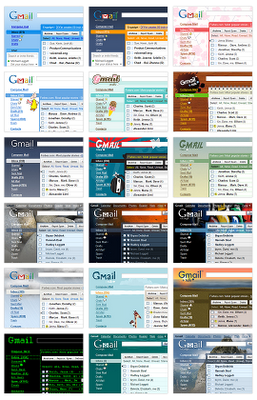
    Themes for Gmail Inbox

    As it's says on the gmail blog yesterday now you can spice up your gmail inbox with 30 new themes. Gmail team says if you didn't select one for your self they'll apply a theme automatically ! So why not log in to your gmail and add a theme by your self ?

    So here is how to do it. As soon as you have log in to your gmail account you'll notice a new banner like this.


    Click the link on it says "Themes tab" Or else do it on the hard way. Go to the gmail settings which showing on the top right hand side. Then the settings window appears and you can see a new tab appears in the end saying "Themes" Click that one and select a theme which you like.


    Here are some of the great themes you'll find in there.