Showing posts with label Google. Show all posts

May 23, 2023

Something went wrong / There was a glitch, try again in a few seconds error in Google Nest Mini


I have a Google Nest Mini connected to my smart home and in the past few days, it was not executing my commands most of the time. Below are the error messages which google assistant gave me.

"Something went wrong. Try again in a few seconds."

"There was a glitch. Try again in a few seconds."

This was becoming a very annoying thing to me and decided to search for this error.


September 10, 2009

Google Wave Arrives This Month

On September 30th Google will start sending 100,000 invites for the early test of Google Wave. So, there is chance for more people to experience this personal communication and collaboration tool which was announced at the Google I/O conference on May 27, 2009. It can import Twitter, provide real-time chat, play back past conversations, and even allows for drag-and-drop file uploads. I'm so excited about Google Wave and hoping to use it soon.


This is how it's explained in Wikipedia.
"It is a web based service, computing platform, and communications protocol designed to merge e-mail, instant messaging, wiki, and social networking. It has a strong collaborative and real-time focus supported by extensions that can provide, for example, robust spelling/grammar checking, automated translation between 40 languages, and numerous other extensions."


In this small Video Google wave is explained very well.

September 9, 2009

Google Monopoly - City Streets

Google is taking over the whole word. Just to prove that now they are come up with a online version of classic popular board game called Monopoly. Yes that's true. The board game Monopoly is about to launch an online version with Google Maps. The release date set to September 9 (which is today) and still I was not able to view the teaser site.


According to the Monopoly City Streets Blog due to heavy traffic there website is down for the moment. But they are asking from us to be more patient and keep trying to log in to the website.
So, Quit farming on Facebook and try to register on Google Monopoly - City Streets website.

August 12, 2009

Google Voice

For my point of view Google Voice is great free service that we all should have. It's still on Beta testing and you can only get it by an invitation. Google voice is basically phone redirecting service. You'll have a Google phone number and all your other phone numbers are associated with it. You can decide which phone should ring according to who's calling. It can be your home phone, Office phone or your cell phone. You also get standard features like call forwarding, Voice mail, SMS and call conferencing with Google Voice. Best thing is if you change your cell phone number, Office phone number or may be your home phone number you just have to change it within the program, So you don't have to bother to send the news to everybody that you have changed your number. Your Google number will remain same no matter what.


If you interested on it click here to see how Google Voice works with your phones.

Click here to find out what's new on Google Voice.

If you are lucky enough to have a Google Voice account click here to log in to your account.


July 19, 2009

How To Manage Photos Uploaded to Blogger

As a Google Blogger you may already uploaded hundreds of photos to your blogs. Did you ever imagine that you can see all of those pictures you have uploaded in one place ? or may be to delete some of the photos that you are not using anymore on your blog ? Picasa web albums from Google will hold all those pictures for you. You can manage all your uploaded photos from there.

You can sign in to it using your Google Account. Once you get in you can see all of your photos uploaded to your blogger blogs. Photos uploaded to your blogs are contained in different folders according to the number of blogs you have. The folder name will be your blog name. If you delete an image from the Blogger album here, the image will be removed from your Blogger blog as well, so please delete images with care!


June 4, 2009

Can't Open My Blog On Internet Explorer

For Past month I have faced some problems with my technology blog to get it open on the Internet explorer web browser. When I tried to open it using Internet explorer it gave me an "Operation Aborted" error. I couldn't open it. But I was able to open my other blog in the internet explorer without any problem and also for other web browsers like Firefox or chrome don’t seem to have this problem. Because this is becoming a frustration for my readers who uses internet explorer as their web browser I decided to search about it.

I have read many web sites and blogs and finally found some answers for it. This problem mainly caused by Followers Gadget or may be because of a third party Java Script. For my case it was the Followers gadget.

Since this issue was not fixed yet the only option is to remove the Followers gadget from your blog and if it didn't solve the problem try to remove other third party Java scripts you added to your blog.

I know this is not an easy thing to do. Removing certain things might impact the appearance of your blog badly. But for the time been this is our only hope. If you really wish to keep the Followers gadget try to put it in as low as possible position on your side bars. It fixed the problem for my other blog. I'm trying to do the same on this blog also.

You can find more information about this problem and any other problems you have with Blogger from this blog

June 1, 2009

Google Chrome 2

If you are tired with your current web browsers, Try newly released Google Chrome version 2. It's been a beta test for this since March and now they have released the final version of it. It's super fast and stable also they have fixed lot of problems that came with the first release. From the speed it's only one step behind on Apple Safari web browser. That means it has beaten the Mozilla Firefox and Microsoft Internet Explorer.

So, How to install it on your computer ? Probably you are having a older version of Chrome running on your computer. If you have it open the browser and go to tools button on the browser then press About Google Chrome option. It will open up a window and in there down at the bottom you'll find a update now button. If you are new to Google Chrome please go to this website and download it to your computer. Follow this video if you have difficulties following my steps.


January 17, 2009

Untold AdSense Facts

Today I'm going to share my third ebook about Google Adsense program. It is a 25 Page small ebook written by Lisa Irby and this ebook is also in PDF format so you have to have a PDF reader software on your computer. Read it and maximize your earnings through google.

Download Untold AdSense Facts from RapidShare

You might need Adobe reader to read this ebook. Download Adobe Reader 9 from here

January 6, 2009

How to maximize your earnings through Google Adsense

Hi Everyone !

Today I'm releasing two of world famous ebooks about Google Adsense. I used to follow these when I started blogging last year. So far it helped me a lot to improve . Hope you guys & girls like these uploads. They are in PDF format so you'll need Adobe reader to open them.

These ebooks contains A to Z about Google Adsense. So If you are new to this, it doesn't matter. You'll get to know everything about Google Adsense and also about Blogging just after reading these ebooks.

Download them from here

If you like these uploads please subscribe to my posts.


November 21, 2008

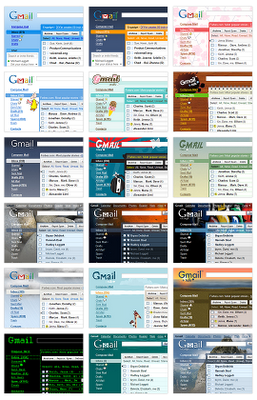
Themes for Gmail Inbox

As it's says on the gmail blog yesterday now you can spice up your gmail inbox with 30 new themes. Gmail team says if you didn't select one for your self they'll apply a theme automatically ! So why not log in to your gmail and add a theme by your self ?

So here is how to do it. As soon as you have log in to your gmail account you'll notice a new banner like this.


Click the link on it says "Themes tab" Or else do it on the hard way. Go to the gmail settings which showing on the top right hand side. Then the settings window appears and you can see a new tab appears in the end saying "Themes" Click that one and select a theme which you like.


Here are some of the great themes you'll find in there.